How to Publish a Gradle Project on Maven Central
You can publish a Java or Kotlin library built with Gradle on Maven Central like this.
First setup your Gradle build to produce a valid bundle for Maven Central.
-
Include the Maven Publish Plugin in your build.
-
Setup building of Javadoc and Source archives using Dokka.
-
Set the required POM metadata in Gradle like this.
See here for a complete working example.
Now you can run gradle publish to create the Maven bundle in the mavenPublish directory (which you probably want to include in .gitignore).
Secure your Gradle builds with AppArmor
If you have a Linux system with AppArmor, you can use it to secure your Gradle builds.
Here is how I installed it on Ubuntu Linux:
-
Make sure you have a Java Development Kit installed.
-
Set the
JAVA_HOMEenvironment variable to point to your JDK by creating a file/etc/profile.d/java.shwith this content:#!/bin/sh export JAVA_HOME=/usr/lib/jvm/java-21-openjdk-amd64 -
Make a manual installation of Gradle in
/opt/gradle. -
Make it available in PATH:
$ cd /usr/bin
$ sudo ln -s ../../opt/gradle/gradle-8.14.3/bin/gradle .
Speed-up and secure your Maven builds with Maven Daemon
You can speed-up Maven builds considerably by using Maven Daemon.
Here is how I installed it on Ubuntu Linux:
-
Make sure you have a Java Development Kit installed.
-
Set the
JAVA_HOMEenvironment variable to point to your JDK by creating a file/etc/profile.d/java.shwith this content:#!/bin/sh export JAVA_HOME=/usr/lib/jvm/java-21-openjdk-amd64 -
Unpack it into
/opt -
Make it available in PATH:
$ cd /usr/bin
$ sudo ln -s ../../opt/maven-mvnd-1.0.2-linux-amd64/bin/mvnd .
$ sudo ln -s mvnd mvn
You can configure IntelliJ IDEA to use it by setting Maven home path to /opt/maven-mvnd-1.0.2-linux-amd64.
You need to do this for all existing Maven projects you have. Also make sure that the
registry setting maven.use.scripts is true.
Simple HTML DSL for Kotlin
As I wrote a while ago, I have been trying different approaches for server-side HTML generation in Kotlin, with focus on good support for generating partials without a single root element (which is important for htmx).
Given Kotlin’s good support for internal DSLs, I decided to explore that route, and try kotlinx.html and HtmlFlow. They both make great promises of encoding the entire HTML standard and enforce valid HTML at compile time. This sounds very nice in theory, but in practice they are quite a disappointment.
Server-side HTML generation
I have been trying out htmx with Kotlin and http4k.
To use htmx, you need some way of generating HTML on the server. In Kotlin, you have plenty of options, both Kotlin specific ones and everything from the broader Java/JVM ecosystem. There are two main categories here, template languages and internal DSLs.
Given Kotlin’s good support for internal DSLs, I decided to explore that route, and try kotlinx.html and HtmlFlow. They both make great promises of encoding the entire HTML standard and enforce valid HTML at compile time. This sounds very nice in theory, but in practice they are quite a disappointment.
No streaming with pgJDBC
I am using PostgreSQL from a Kotlin (JVM) application with the pgJDBC driver.
According to the documentation, you
can get results from a query based on a cursor
to avoid loading the whole result set into the application’s memory at once by calling the setFetchSize() method with
a positive value on the Statement before issuing the query.
I had a non-trivial query which generated a lot of rows (several thousands), and I only needed the first hundred or so. So I hoped I could activate the cursor, iterate through the result set until I had got all the data I needed and then close it long before reaching the end.
How to capture log events in tests with Log4j 2
Sometimes you want to verify that your program actually logs what it is supposed to be logging.
When using Apache Log4j 2 as logging framework, it can be done like this:
- Include this dependency (for Maven, adjust appropriately for other build systems):
<dependency>
    <groupId>org.apache.logging.log4j</groupId>
    <artifactId>log4j-core</artifactId>
    <type>test-jar</type>
    <scope>test</scope>
</dependency>- Import some stuff:
import org.apache.logging.log4j.core.Logger;
import org.apache.logging.log4j.core.LoggerContext;
import org.apache.logging.log4j.test.appender.ListAppender;- Add a
ListAppenderto the logger you are interested in:
var loggerContext = LoggerContext.getContext(false);
var logger = (Logger) loggerContext.getLogger(MyClass.class);
var appender = new ListAppender("List");
appender.start();
loggerContext.getConfiguration().addLoggerAppender(logger, appender);- Exercise your code which should be logging.
- Extract what was logged:
List<String> loggedStrings =
        appender.getEvents().stream().map(event -> event.getMessage().toString()).collect(Collectors.toList());
Update:
How to run exec-maven-plugin only if a file is not up-to-date
In my Maven build, I use exec-maven-plugin to run an external tool for Java code generation. In this case the flatbuffers compiler (flatc).
By default, flatc always runs, so you always get a new .java file. This will always trigger Java compiler to run, which will in turn always trigger jar packaging to run, etc. I would like flatc to only run if it’s source file is updated, so I can get a properly incremental build and avoid needlessly recompiling.
Objects vs. data structures
Several popular statically typed programming languages, including C++, Java and C#, have a serious design flaw. They make no useful distinction between objects in the OOP sense and plain data structures.
A plain data structure should only be a dumb container for data. It should not have any behaviour, only simple accessors for data items in it. It should not be possible to override data accessors. It should be clear and transparent what it does.
Typesafe’s Reactive Straw man
In their quest to promote Reactive, Typesafe is beating up a straw man by portraying blocking I/O in a particularly stupid way which is rarely (if ever) done in practice.
In a recent webinar, I found this slide which suggests that a blocking I/O operation will waste CPU time while waiting for the I/O to complete.
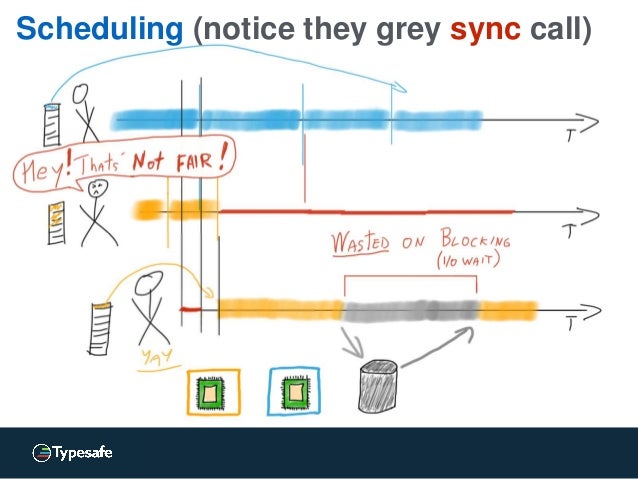
If I understand it correctly, it does not actually work like this in any reasonable runtime environment / operating system. As an example, consider doing java.io.InputStream.read() on a socket in Java (or any other language on the JVM) on Linux. If there is not data available in the buffer, this call will block until some packet is received by the network interface, which may take several seconds. During that time, the JVM Thread is blocked, but the JVM and/or Linux kernel will reschedule the CPU core to another thread or process and will wait for the network interface to issue an interrupt when some packet is received. You will waste some time on thread scheduling overhead and user/kernel mode switching, but that’s typically much less than the I/O waiting time.
Create a self-contained .jar file with Maven
If you want to create a self-contained .jar file, with all library dependencies included, you can do it with Maven. Include this in your pom.xml:
<build>
        <plugins>
            <plugin>
                <groupId>org.apache.maven.plugins</groupId>
                <artifactId>maven-assembly-plugin</artifactId>
                <version>2.4</version>
                <configuration>
                    <archive>
                        <manifest>
                            <mainClass>com.yourcompany.youapp.Main</mainClass>
                        </manifest>
                    </archive>
                    <descriptorRefs>
                        <descriptorRef>jar-with-dependencies</descriptorRef>
                    </descriptorRefs>
                </configuration>
                <executions>
                    <execution>
                        <id>make-jar-with-dependencies</id>
                        <phase>package</phase>
                        <goals>
                            <goal>single</goal>
                        </goals>
                    </execution>
                </executions>
            </plugin>
	</plugins>
    </build>
Then when you run mvn package, you will get a target/*-jar-with-dependencies.jar file which you can run with java -jar.
Running Jetty as a service in Ubuntu Linux
Jetty is a popular open source Java application server. In order to run it as a service on a Linux server, they recommend using a horribly overcomplicated and quite fragile script.
In Ubuntu server, there is a better way. Leverage Upstart and its declarative job definitions.
First install Jetty into /opt/jetty and create a jetty user:
useradd --user-group --shell /bin/false --home-dir /opt/jetty/temp jettyThen create a file /etc/init/jetty.conf with content like this:
Don’t use large BLOBs in MySQL from Java
The MySQL database can store large chunks of binary data (up to 1 GB) using the BLOB data types.
However, this does not work well if you access the MySQL database from Java (or any other JVM based language) using the MySQL JDBC driver.
The JDBC API supports an efficient stream based way to handle BLOBs, but the MySQL JDBC driver does not implement this properly. It works, but it will buffer all data in memory in a way which is very inefficient and can make your JVM run out of memory if the BLOBs are large.
Don’t use PipedOutputStream on Android
I was using java.io.PipedOutputStream in an Android app. The app performed horribly bad. After doing some profiling, it turned out that the call to PipedOutputStream.write(byte[]) that was really slow. After digging into the Android source code, I discovered that PipedOutputStream.write(byte[]) was not implemented, it just delegated to the default implementation in OutputStream which iterate through the array and call PipedOutputStream.write(byte) for each byte.
Since PipedOutputStream.write(byte) does some synchronization and Object.notifyAll() each time, it is really slow to do this 1000 times when you write a block of 1 KB data.
Using an embedded SQL database in Java web application
You have a Java web application needing a relational SQL database. According to JavaEE conventions, you declare the DataSource in web.xml:
<resource-ref>
    <res-ref-name>jdbc/DS</res-ref-name>
    <res-type>javax.sql.DataSource</res-type>
    <res-auth>Container</res-auth>
</resource-ref>
and then fetch it in code with (DataSource)new InitialContext().lookup("java:comp/env/jdbc/DS").
Using Maven, Jetty and HSQLDB, you can very easily run the web application for local testing without having to setup neither a web container, nor a database. Add this to pom.xml:
Web application frameworks in Java
When you know which type of web application you are to develop, it’s time to have a look at some possible choices.
I have tried to categorize some modern and popular web application frameworks in Java.
Simple server driven MVC page based
This category contains the traditional frameworks used for developing web applications with purely server driven application logic. They are based on complete HTML pages and uses the Model-View-Controller design pattern.
Using Vaadin with Maven
Vaadin is a comprehensive framework for developing web applications in Java. The Vaadin web site presents a number of ways to use Vaadin with Maven, but I am not completely satisfied with any of those. Here is how I do it.
Use a pom.xml like this:
<?xml version="1.0" encoding="UTF-8"?>
<project xmlns="http://maven.apache.org/POM/4.0.0" xmlns:xsi="http://www.w3.org/2001/XMLSchema-instance"
	xsi:schemaLocation="http://maven.apache.org/POM/4.0.0 http://maven.apache.org/maven-v4_0_0.xsd">
	<modelVersion>4.0.0</modelVersion>

	<groupId>com.thecompany</groupId>
	<artifactId>theapp</artifactId>
	<version>1.0</version>
	<packaging>war</packaging>
	<name>The App</name>

	<dependencies>
        <dependency>
            <groupId>com.vaadin</groupId>
            <artifactId>vaadin</artifactId>
            <version>6.3.3</version>
        </dependency>
	</dependencies>

	<build>
		<plugins>
	        <plugin>
	            <groupId>org.apache.maven.plugins</groupId>
	            <artifactId>maven-war-plugin</artifactId>
	            <configuration>
	              <overlays>
	                <overlay>
		              <groupId>com.vaadin</groupId>
		              <artifactId>vaadin</artifactId>
		              <type>jar</type>
		              <includes>
		                <include>VAADIN/**</include>
		              </includes>
	                </overlay>
	              </overlays>
	            </configuration>
	         </plugin>

		<plugin>
			<groupId>org.mortbay.jetty</groupId>
			<artifactId>maven-jetty-plugin</artifactId>
			<version>6.1.17</version>
		</plugin>
        </plugins>
	</build>
</project>
And a src/main/webapp/WEB-INF/web.xml like this:
Implementing POX Web Services with Spring WS and JAXB
Spring Web Services together with JAXB 2.0 provides a convenient way to implement POX Web Services in Java.
POX means Plain Old XML, and a POX Web Service is a protocol based on sending XML over HTTP without using any well-known protocol framework like SOAP or XML-RPC.
First you have to define annotated JAXB classes for all XML request and response messages. If you have a schema, you can generate them with the xjc tool. Or you can create and annotate them manually. It can be a good idea to make one abstract base class for all requests, and one for all responses.
How to implement RESTful JSON Web Services in Java
You can implement RESTful Web Services in Java using the JAX-RS framework.
JAX-RS is part of the JavaEE 6 platform. But if you are not using a JavaEE 6 application server, you can use the reference implementation Jersey and embed it in any web application server.
However, it’s quite awkward to produce JSON output from Jersey.
Jersey has some support for producing JSON via JAXB, but to get the NATURAL encoding (which you probably want) you need JAXB 2.1. And that can be problematic since JAXB 2.0 is bundled with JavaSE 6 and with some application servers (such as WebLogic). Overriding that with a later version of JAXB can be really difficult. Using JAXB is also a bit clumsy if you only want to produce JSON.
java.util.Map is broken in Java 5
Java 5 added generics. The collection classes was modified to make use generics to provide compile-time type-safe collections. Sadly, this was not done properly.
The worst problem is in the interface java.util.Map:
public interface Map<K,V> {
    // more methods...

    V get(Object key);
    V remove(Object key);
    boolean containsKey(Object key);
    boolean containsValue(Object key);
}
The key parameters to these methods ought to be declared to be K and not Object. Now we don’t get any type-safety for those methods. If you create a HashMap<String,String> and then by mistake try to use an int as key when looking up a value, you will not get any compile-time error. Worse yet, you will not even get any run-time error, it will just appear as if there is no value with that key (which in some sense is correct).
Type safe JSP and JSTL
When using JavaServer Pages, you want to use JSTL to be able to to flow-control (iterations and conditionals) in a reasonable way. And the recommended way to use JSTL is to use the Expression Language (EL).
However, using EL is not a good idea at all. Contrary to Java and plain JSP, EL lacks static typing. This means that many errors which the compiler can catch is not detected until runtime when using EL. And even worse, EL doesn’t even do proper type checking at runtime. In many cases you just end up with an empty string when it in fact is a type error.
java -classpath *.jar
It’s quite annoying that you cannot use wildcards in the -classpath command line option to java and javac. Quite often you want to include all .jar files in one directory.
Here is a way to get that effect:
java -classpath `echo lib/*.jar | sed -e “s/ /:/g”` org.foo.MyApp
You can even include all .jar files in a whole hierarchy of directories:
java -classpath `find repository -name *.jar -printf %p:` org.foo.MyApp
Configure web applications in JBoss
When you deploy a web application in a JavaEE application server, it usually consist of a .war archive.
Sometimes, the web application needs some configuration parameters. The most common way to do this is to have <context-param> in web.xml. That is simple and works fine except that the web.xml file needs to be inside the .war archive. This makes it inconvenient to change a configuration parameter since you have to repack the .war archive. You also have to set the same value several times if several web applications share the same configuration.
Common mistakes with exceptions in Java
Unintentional catching of runtime exceptions
Unfortunately, checked exceptions in Java are defined as all Exceptions which are not RuntimeExceptions. This makes it a bit tricky to catch all checked exceptions (but not any runtime exceptions). It would have been better if checked exceptions were defined by a specific class, CheckedException, but that’s too late to change now.
Too often Java programmers catch all exceptions when they really only should catch checked exceptions. However, there is a quite easy workaround to catch all checked exceptions, and nothing else:
Who needs rmiregistry?
Java Remote Method Invocation (RMI) contains a tool rmiregistry to run a stand-alone remote object registry. According to the RMI tutorial, rmiregistry is normally used in an RMI application.
I wonder why. It’s actually almost as simple to run the remote object registry within the RMI server. You only have to use java.rmi.registry.LocateRegistry#createRegistry(int port) method like this:
Registry registry = LocateRegistry.createRegistry(port);
registry.bind("Foo", stub);
Here is a complete example.