October 2026
What is AI?
Definition
By Artificial Intelligence (AI), I specifically mean systems powered by Large Language Models (LLMs).
How we should understand AI
There are many views on this. Some say it is just a statistical model and fundamentally just a computer program, though a very complicated one. Others say it has intelligence comparable to a human, and perhaps even has a consciousness.
I think both these extremes get it wrong. On the one hand, you cannot reduce today’s LLM-powered AI systems to just a statistical model and a regular computer program and believe that helps you understand it. On the other hand, I see no reason to believe that today’s AI systems have human-like intelligence, let alone consciousness.
MySuite
As I have written before, you can build efficient and easy to host web apps with Go and SQLite.
I have now developed a suite of personal productivity apps with Go, SQLite and TypeScript+Preact for the web UI.
And a simple app to save links with Go, SQLite and htmx:
I call the whole suite MySuite, which also contains a password manager MyPass made in Rust.
Each of those five has its own native Android app (made in Kotlin).
From XTerm to Alacritty
I have written before how to support tabs and scrollback in XTerm with tmux.
Now it seems like Wayland is replacing X11 as the default window system in Linux desktops. And XTerm, as the name implies, only supports X11. So I wanted to replace XTerm with another terminal with native Wayland support.
After trying a few options, I decided to go with Alacritty. As a bonus, you also get clickable hyperlinks (OSC 8).
Here is how I configured it to work with tmux:
May 2026
Remote SQLite backup
I wrote earlier about how to backup a small SQLite database.
That solution works well for small databases, but can become impractical for larger databases. In particular if the machine with the database has not enough disk space for another copy of it, and you want to backup to another machine.
One option is to use sqlite3_rsync, but I could not get that to work, it kept running out of memory. So I found another way, dump the database to text and gzip it. Combined with ssh, you can make a backup to a remote machine without storing anything extra on disk on the database machine. Run this on the machine where you want to have the backup:
February 2026
Ubuntu in Ubuntu
I want an easy way to run one or more ephermal Linux VMs in Ubuntu desktop, including the possibility to mount host directories into them in an efficient fashion. Those VMs should have the same CPU architecture and hardware features as the host, no need to emulate some foreign CPU or special hardware, and no GUI in the VMs. The intended use case is sandboxing and isolation for security and reproducability reason. To be used as a cheaper alternative to a remote cloud instance. Or as a more secure alternative to Docker/Podman containers, with possibility to install Docker or Podman in the VM, and run containers there without affecting the host or other VMs (it’s not feasible to nest containers in a secure manner without a proper VM).
January 2026
How to run a user service with systemd
Most Linux systems uses systemd as init and service manager nowadays.
You can use systemd to start your services, so that they are automatically restarted if they crash, and automatically started when the system boots. You can even do this as a regular user, without root access (then the service will run with permissions of your user), and have it automatically started when the system boots without you having to login.
- Create the
~/.config/systemd/userdirectory if necessary:
mkdir -p ~/.config/systemd/user- Create a service unit configuration file
for your service in that directory
~/.config/systemd/user/myservice.service:
[Unit]
Description=MyService

[Service]
Type=exec
LoadCredential=my-password:%h/myservice.pw
ExecStart=%h/.local/bin/myservice -password-file ${CREDENTIALS_DIRECTORY}/my-password
Restart=on-failure

NoNewPrivileges=true
AppArmorProfile=myservice

[Install]
WantedBy=default.target- Load the service definition:
systemctl --user daemon-reload- Enable the service:
systemctl --user enable myservice.service- Start the service
systemctl --user start myservice.service- Enable starting the service on boot without login (you might need to run this as root):
sudo loginctl enable-lingerThis will provide the service with credentials from file ~/myservice.pw, and run the service with AppArmor
profile myservice (which you must create and load first).
How to Publish a Gradle Project on Maven Central
You can publish a Java or Kotlin library built with Gradle on Maven Central like this.
First setup your Gradle build to produce a valid bundle for Maven Central.
-
Include the Maven Publish Plugin in your build.
-
Setup building of Javadoc and Source archives using Dokka.
-
Set the required POM metadata in Gradle like this.
See here for a complete working example.
Now you can run gradle publish to create the Maven bundle in the mavenPublish directory (which you probably want to include in .gitignore).
October 2025
Linux sandboxing with bubblewrap
AppArmor is a good way to sandbox programs on a Linux system, but it has some limitations. In particular, it requires you to define a static profile for each program, and changing profiles requires root access. This can be impractical for ad-hoc usages, and in particular if you want to give the program access to a particular directory (such as the current directory). These gaps can be filled with bubblewrap.
Here is how you can use it on Ubuntu 24.04.
Sandbox IntelliJ IDEA with AppArmor
If you have a Linux system with AppArmor, you can use it to sandbox IntelliJ IDEA.
Do not install IntelliJ with snap, download the .tar.gz archive instead and unpack it in /opt/JetBrains/.
Then add this file to /etc/apparmor.d.
#include <tunables/global>

profile idea /opt/JetBrains/idea*/bin/* {
    #include <abstractions/base>
    #include <abstractions/consoles>
    #include <abstractions/nameservice>
    #include <abstractions/ssl_certs>
    #include <abstractions/gnome>
    #include <abstractions/xdg-open>
    #include <abstractions/dbus-session>

    /etc/** r,
    /dev/** r,
    /dev/ptmx rw,
    @{PROC}/ r,
    @{PROC}/** r,
    /sys/** r,
    /bin/* rixm,
    /usr/bin/{[^s]*,?[^n]*,??[^a]*,???[^p]*} rixm,
    /usr/local/bin/** rixm,
    /usr/include/** r,
    /usr/lib/ r,
    /usr/lib/** rixm,
    /usr/lib64/ r,
    /usr/lib64/** rixm,
    /usr/libexec/** rixm,
    /usr/sbin/* rixm,
    /usr/share/** r,

    /{,snap/core/[0-9]*/,snap/snapd/[0-9]*/}usr/bin/snap mrCx -> snap_browsers,

    owner @{PROC}/@{pid}/coredump_filter rw,
    owner /tmp/ r,
    owner /tmp/** rwlkix,
    owner /var/tmp/ r,
    owner /var/tmp/** rwlkix,
    owner /run/user/@{uid}/at-spi/* rw,
    owner /run/user/@{uid}/bus rw,
    owner /run/user/@{uid}/dconf/user rw,
    owner /run/user/@{uid}/gdm/Xauthority r,
    owner /run/user/@{uid}/keyring/ssh rw,

    /opt/JetBrains/** rixm,

    / r,
    /home/ r,
    owner @{HOME}/ r,
    owner @{HOME}/.bashrc r,
    owner @{HOME}/.bash_aliases r,
    owner @{HOME}/.cache/JNA/*/ r,
    owner @{HOME}/.cache/JetBrains/ r,
    owner @{HOME}/.cache/JetBrains/** rwklix,
    owner @{HOME}/.cache/ibus/* rw,
    owner @{HOME}/.config/JetBrains/ r,
    owner @{HOME}/.config/JetBrains/** rwkl,
    owner @{HOME}/.config/dconf/user r,
    owner @{HOME}/.config/ibus/bus/ r,
    owner @{HOME}/.config/ibus/bus/* r,
    owner @{HOME}/.gitconfig r,
    owner @{HOME}/.gitignore r,
    owner @{HOME}/.gradle/ r,
    owner @{HOME}/.gradle/** rwklixm,
    owner @{HOME}/.inputrc r,
    owner @{HOME}/.ivy2/** rwkl,
    owner @{HOME}/.java/** rwkl,
    owner @{HOME}/.junie/ r,
    owner @{HOME}/.junie/** rwkl,
    owner @{HOME}/.local/bin/* rix,
    owner @{HOME}/.local/share/JetBrains/ r,
    owner @{HOME}/.local/share/JetBrains/** rwklix,
    owner @{HOME}/.local/share/kotlin/** rwklix,
    owner @{HOME}/.m2/ r,
    owner @{HOME}/.m2/** rwkl,
    owner @{HOME}/.profile r,
    owner @{HOME}/.ssh/ r,
    owner @{HOME}/.ssh/config r,
    owner @{HOME}/.ssh/known_hosts* r,
    owner @{HOME}/.ssh/*.pub r,
    owner @{HOME}/src/ r,
    owner @{HOME}/src/** rwklix,

    signal (send,receive) set=(int,term,kill) peer=idea,

    ptrace peer=idea,

	profile snap_browsers {
	  #include <abstractions/base>
	  #include <abstractions/dbus-session-strict>

	  /etc/passwd r,
	  /etc/nsswitch.conf r,
	  /etc/fstab r,
 	  /etc/local/fstab r,

	  # noisy
	  deny owner /run/user/[0-9]*/gdm/Xauthority r, # not needed on Ubuntu

	  /{,snap/core/[0-9]*/,snap/snapd/[0-9]*/}usr/bin/snap mrix, # re-exec
	  /{,snap/core/[0-9]*/,snap/snapd/[0-9]*/}usr/lib/snapd/info r,
	  /{,snap/core/[0-9]*/,snap/snapd/[0-9]*/}usr/lib/snapd/snapd r,
	  /{,snap/core/[0-9]*/,snap/snapd/[0-9]*/}usr/lib/snapd/snap-seccomp rPix,
	  /{,snap/core/[0-9]*/,snap/snapd/[0-9]*/}usr/lib/snapd/snap-confine Pix,
	  /var/lib/snapd/system-key r,
	  /run/snapd.socket rw,

	  /usr/bin/systemctl ix,

	  @{PROC}/version r,
	  @{PROC}/cmdline r,
	  @{PROC}/sys/net/core/somaxconn r,
	  @{PROC}/sys/kernel/seccomp/actions_avail r,
	  @{PROC}/sys/kernel/random/uuid r,
	  owner @{PROC}/@{pid}/cgroup r,
	  owner @{PROC}/@{pid}/mountinfo r,
	  owner @{HOME}/.snap/auth.json r, # if exists, required

	  dbus send bus="session" path="/org/freedesktop/systemd1" interface="org.freedesktop.systemd1.Manager" member="StartTransientUnit" peer=(name="org.freedesktop.systemd1"),
	  dbus receive bus="session" path="/org/freedesktop/systemd1" interface="org.freedesktop.systemd1.Manager" member="JobRemoved",

	  /sys/fs/cgroup/cgroup.controllers r,
	  /sys/kernel/security/apparmor/features/ r,
          /sys/kernel/security/apparmor/features/** r,

	  # allow launching official browser snaps.
	  /snap/{brave,chromium,firefox,opera}/[0-9]*/meta/{snap.yaml,hooks/} r,
	  /var/lib/snapd/sequence/{brave,chromium,firefox,opera}.json r,
	  /var/lib/snapd/inhibit/{brave,chromium,firefox,opera}.lock rk,
	}

}
Then run sudo service apparmor reload to activate it (it will be loaded automatically on boot). This is tested on Ubuntu desktop 24.04.
September 2025
Secure your Go builds with AppArmor
If you have a Linux system with AppArmor, you can use it to secure your Go builds.
First install Go in /usr/local/go as in the the instructions.
Then add this file to /etc/apparmor.d, replace ${HOME} with your home directory.
#include <tunables/global>

profile go /usr/local/go/bin/go {
    #include <abstractions/base>
    #include <abstractions/consoles>
    /tmp/ r,
    /tmp/** rwkix,
    @{PROC}/** r,
    /sys/** r,
    /dev/** r,
    /etc/** r,
    /usr/** r,
    /bin/** ix,
    /usr/bin/** ix,
    /usr/libexec/** ix,
    /usr/lib/** ix,

    /usr/local/go/** rix,

    owner @{HOME}/.config/go/** rw,
    owner @{HOME}/.cache/go-build/** rwkix,
    owner @{HOME}/.cache/JetBrains/IntelliJIdea*/tmp/GoLand/** rwkix,
    owner @{HOME}/.cache/JetBrains/IntelliJIdea*/coverage/** rwk,
    owner @{HOME}/.local/share/JetBrains/IntelliJIdea*/go-plugin/** rix,
    owner @{HOME}/.config/dlv/** r,
    owner @{HOME}/.gitconfig r,
    owner @{HOME}/.gitignore r,
    owner @{HOME}/go/** rwkl,
    owner @{HOME}/go/bin/* rwklix,
    owner @{HOME}/src/** rwk,

    /etc/resolv.conf r,
    @{PROC}/sys/net/** r,
    /run/systemd/resolve/** r,
    network,

    signal (receive) set=(int,term,kill),

    ptrace,
}

profile go-fmt /usr/local/go/bin/gofmt {
    #include <abstractions/base>
    #include <abstractions/consoles>
    /tmp/** rwkix,

    /usr/local/go/** rix,

    owner @{HOME}/.config/go/** rw,
    owner @{HOME}/.cache/JetBrains/IntelliJIdea*/tmp/GoLand/** rwk,
    owner @{HOME}/go/** rwk,
    owner @{HOME}/src/** rwk,

    signal (receive) set=(int,term,kill),
}

profile go-bin ${HOME}/{go/bin/*,.cache/go-build/**,.cache/JetBrains/IntelliJIdea*/tmp/GoLand/*} {
    #include <abstractions/base>
    #include <abstractions/consoles>
    /etc/** r,
    /bin/** ix,
    /usr/bin/** ix,
    /tmp/ r,
    /tmp/** rwk,

    /usr/local/go/** rix,

    owner @{HOME}/.config/go/** r,
    owner @{HOME}/.cache/go-build/** rix,
    owner @{HOME}/.cache/JetBrains/IntelliJIdea*/tmp/GoLand/** rix,
    owner @{HOME}/go/** r,
    owner @{HOME}/go/bin/* rix,
    owner @{HOME}/src/** r,

    /etc/resolv.conf r,
    @{PROC}/sys/net/** r,
    /run/systemd/resolve/** r,
    network,

    signal (receive) set=(int,term,kill),

    ptrace (tracedby, readby) peer=go,
}
Then run sudo service apparmor reload to activate it (it will be loaded automatically on boot). This is tested un Ubuntu desktop 24.04.
It will also enable use of the Go plugin to IntelliJ IDEA.
Secure your Rust builds with AppArmor
If you have a Linux system with AppArmor, you can use it to secure your Rust builds.
First install Rust with rustup in ~/.cargo/bin.
Then add this file to /etc/apparmor.d, replace ${HOME} with your home directory.
#include <tunables/global>

profile cargo-bin ${HOME}/{.cargo/bin/*,.local/share/JetBrains/IntelliJIdea*/intellij-rust/bin/linux/x64/*} {
    #include <abstractions/base>
    #include <abstractions/consoles>

    @{PROC}** r,
    /sys/** r,
    /usr/bin/** ix,
    /usr/include/** r,
    /usr/libexec/** rix,
    /usr/share/** r,
    /tmp/ r,
    /tmp/** rwkix,

    owner @{HOME}/.gitconfig r,
    owner @{HOME}/.gitignore r,
    owner @{HOME}/.rustup/** r,
    owner @{HOME}/.rustup/toolchains/** rix,
    owner @{HOME}/.cargo/ r,
    owner @{HOME}/.cargo/** rwkl,
    owner @{HOME}/.cargo/bin/** rwklix,
    owner @{HOME}/.local/share/JetBrains/IntelliJIdea*/intellij-rust/** r,
    owner @{HOME}/.local/share/JetBrains/IntelliJIdea*/intellij-rust/bin/linux/x64/* rix,
    owner @{HOME}/.cache/JetBrains/IntelliJIdea*/intellij-rust/** rwk,
    owner @{HOME}/src/** rwklix,

    /etc/resolv.conf r,
    @{PROC}/sys/net/** r,
    network,
    /run/systemd/resolve/** r,

    signal (receive) set=(int,term,kill),
}

profile rustup ${HOME}/.cargo/bin/rustup {
    #include <abstractions/base>
    #include <abstractions/consoles>

    /etc/** r,
    @{PROC}** r,
    /sys/** r,
    /usr/bin/** ix,
    /usr/include/** r,
    /usr/libexec/** rix,
    /usr/share/** r,
    /tmp/ r,
    /tmp/** rwkix,

    owner @{HOME}/.gitconfig r,
    owner @{HOME}/.gitignore r,
    owner @{HOME}/.rustup/** rwkl,
    owner @{HOME}/.rustup/toolchains/** rwklix,
    owner @{HOME}/.cargo/ r,
    owner @{HOME}/.cargo/** rwkl,
    owner @{HOME}/.cargo/bin/** rwklix,
    owner @{HOME}/.local/share/JetBrains/IntelliJIdea*/intellij-rust/** r,
    owner @{HOME}/.local/share/JetBrains/IntelliJIdea*/intellij-rust/bin/linux/x64/* rix,
    owner @{HOME}/.cache/JetBrains/IntelliJIdea*/intellij-rust/** rwk,
    owner @{HOME}/src/** rwklix,

    /etc/resolv.conf r,
    @{PROC}/sys/net/** r,
    network,
    /run/systemd/resolve/** r,

    signal (receive) set=(int,term,kill),
}
Then run sudo service apparmor reload to activate it (it will be loaded automatically on boot). This is tested un Ubuntu desktop 24.04.
It will also enable use of the Rust plugin to IntelliJ IDEA.
Secure your Gradle builds with AppArmor
If you have a Linux system with AppArmor, you can use it to secure your Gradle builds.
Here is how I installed it on Ubuntu Linux:
-
Make sure you have a Java Development Kit installed.
-
Set the
JAVA_HOMEenvironment variable to point to your JDK by creating a file/etc/profile.d/java.shwith this content:#!/bin/sh export JAVA_HOME=/usr/lib/jvm/java-21-openjdk-amd64 -
Make a manual installation of Gradle in
/opt/gradle. -
Make it available in PATH:
$ cd /usr/bin
$ sudo ln -s ../../opt/gradle/gradle-8.14.3/bin/gradle .
Speed-up and secure your Maven builds with Maven Daemon
You can speed-up Maven builds considerably by using Maven Daemon.
Here is how I installed it on Ubuntu Linux:
-
Make sure you have a Java Development Kit installed.
-
Set the
JAVA_HOMEenvironment variable to point to your JDK by creating a file/etc/profile.d/java.shwith this content:#!/bin/sh export JAVA_HOME=/usr/lib/jvm/java-21-openjdk-amd64 -
Unpack it into
/opt -
Make it available in PATH:
$ cd /usr/bin
$ sudo ln -s ../../opt/maven-mvnd-1.0.2-linux-amd64/bin/mvnd .
$ sudo ln -s mvnd mvn
You can configure IntelliJ IDEA to use it by setting Maven home path to /opt/maven-mvnd-1.0.2-linux-amd64.
You need to do this for all existing Maven projects you have. Also make sure that the
registry setting maven.use.scripts is true.
July 2025
SQLite backup
As I mentioned earlier, it’s straightforward to use SQLite as the relational database in Go applications. Your data is stored in one single file with a well-defined format and there is no hassle with installing and configuring a separate database.
However, for any serious application you most likely want backup of your data. If your dataset is not very large, and it
is OK to lose updates since the last backup, there is a very simple option. Use the sqlite3 command line tool:
Simple web app with Go
I have been learning the Go programming language lately, and it’s remarkably easy to build simple web apps with it. In particular, with just a few simple tricks, you can make the deployment of such web apps super simple: just one single standalone statically linked binary which stores its data in one single file.
The Go standard library contains everything needed to build a basic web app:
- A production-ready HTTP server
- An URL router
- Interface for SQL databases
- Parsing command line options
- Simple logging
- HTML templating
- HTTP client
If you use the embed feature, you can embed templates and static resources (CSS, JavaScript, images) and produce one single self-contained binary.
January 2025
Simple HTML DSL for Kotlin
As I wrote a while ago, I have been trying different approaches for server-side HTML generation in Kotlin, with focus on good support for generating partials without a single root element (which is important for htmx).
Given Kotlin’s good support for internal DSLs, I decided to explore that route, and try kotlinx.html and HtmlFlow. They both make great promises of encoding the entire HTML standard and enforce valid HTML at compile time. This sounds very nice in theory, but in practice they are quite a disappointment.
September 2024
Server-side HTML generation
I have been trying out htmx with Kotlin and http4k.
To use htmx, you need some way of generating HTML on the server. In Kotlin, you have plenty of options, both Kotlin specific ones and everything from the broader Java/JVM ecosystem. There are two main categories here, template languages and internal DSLs.
Given Kotlin’s good support for internal DSLs, I decided to explore that route, and try kotlinx.html and HtmlFlow. They both make great promises of encoding the entire HTML standard and enforce valid HTML at compile time. This sounds very nice in theory, but in practice they are quite a disappointment.
No streaming with pgJDBC
I am using PostgreSQL from a Kotlin (JVM) application with the pgJDBC driver.
According to the documentation, you
can get results from a query based on a cursor
to avoid loading the whole result set into the application’s memory at once by calling the setFetchSize() method with
a positive value on the Statement before issuing the query.
I had a non-trivial query which generated a lot of rows (several thousands), and I only needed the first hundred or so. So I hoped I could activate the cursor, iterate through the result set until I had got all the data I needed and then close it long before reaching the end.
Linux in Linux with KVM
You can do quite a lot with Docker, but sometimes you want greater capabilities or increased security, then a proper virtual machine with KVM is a good alternative. An example is when you want to run Docker containers in the VM, it’s not easy to nest Docker without forgoing all security.
Just like Alpine Linux is suitable as a base for Docker images, it is also a good option as a guest in a virtual machine.
November 2023
Leafpad with access to system files
As I have explained earlier, I am using Leafpad instead of gedit in my Ubuntu system.
However, recent versions of Ubuntu does not have Leafpad available through APT any longer, you have to install it with
Snap instead. This is quite annoying, since the Snap packaging of Leafpad is too restrictive, it cannot access hidden
files in your home directory, nor anything in ~/bin/. This is not good, since I often want to use Leafpad to edit
such files.
October 2023
From WordPress to Hugo
I have used self-hosted WordPress for this blog since its start in 2006, but I finally got fed up with having to frequently update WordPress itself and a bunch of plugins, or having to constantly worry about security issues. Since I am the only one publishing on this blog, I decided to switch to a static site generator instead, and I chose Hugo, mainly because it is easy to install and does not require any heavy runtime (most of its competitors require Python, Ruby or Node.js).
From screen to tmux
I have written about how to configure screen in XTerm to support Ctrl-Tab and convenient scrolling back in history.
This has worked well for over a decade now, but it seems like screen is not developed very much any longer, and tmux has gained popularity as a more modern and actively developed alternative. So I decided to try it, and was able to replicate my setup with tmux instead of screen. The result was actually simpler, since tmux requires less modification of XTerm config.
May 2023
In-memory database for testing
I have written about using an embedded database like HSQLDB or H2 for testing Java applications. This can still be useful (although JavaEE is not so popular any longer). But even though H2 claims to emulate PostgreSQL and several other popular production SQL databases, sometimes your application uses very specific features of a particular database and you need to test against the real thing to be really sure your application works correctly.
This can conveniently be done using Testcontainers, which run an instance of the real database in a Docker container for your tests. The downside is that this can be significantly slower than an embedded in-memory database like HSQLDB or H2.
April 2023
Alpine rather than distroless
I have been using the distroless Docker base images to package my applications, mainly since I want slim and simple image without unnecessary cruft.
However, they are based on Debian, and Debian is unfortunately not so diligent to fix serious security issues as other distributions like Ubuntu or Alpine. If you scan a distroless image with the grype tool, you get this result:
$ grype gcr.io/distroless/java17-debian11

NAME             INSTALLED              FIXED-IN     TYPE  VULNERABILITY     SEVERITY
libharfbuzz0b    2.7.4-1                (won't fix)  deb   CVE-2023-25193    High
libjpeg62-turbo  1:2.0.6-4              (won't fix)  deb   CVE-2021-46822    Medium
libssl1.1        1.1.1n-0+deb11u4       (won't fix)  deb   CVE-2023-0464     High
openssl          1.1.1n-0+deb11u4       (won't fix)  deb   CVE-2023-0464     High
Furthermore, if small image size is important, distroless is quite overrated. They brags about being so small:
February 2023
How to enable multi-platform Docker builds on Ubuntu 22.04
Docker’s official documentation on how to enable multi-platform Docker builds is a bit intimidating, suggesting you to run the Docker image tonistiigi/binfmt in privileged mode on your machine. I searched for alternatives on Ubuntu, and found this very detailed description. However, with recent versions of Ubuntu and Docker, it is now much easier than that:
- Install QEMU’s static user mode emulation binaries:
sudo apt install qemu-user-static - Install Docker Engine with Buildx support according instructions here (do not install
docker-ceordocker.iofrom Ubuntu’s standard repository). - Create a Docker Buildx builder:
docker buildx create --name multiplatform --bootstrap --use - Verify it:
docker buildx inspect
Then you can do multi-platform Docker builds like this:
docker buildx build --platform linux/amd64,linux/arm64 .
November 2022
How to capture log events in tests with Log4j 2
Sometimes you want to verify that your program actually logs what it is supposed to be logging.
When using Apache Log4j 2 as logging framework, it can be done like this:
- Include this dependency (for Maven, adjust appropriately for other build systems):
<dependency>
    <groupId>org.apache.logging.log4j</groupId>
    <artifactId>log4j-core</artifactId>
    <type>test-jar</type>
    <scope>test</scope>
</dependency>- Import some stuff:
import org.apache.logging.log4j.core.Logger;
import org.apache.logging.log4j.core.LoggerContext;
import org.apache.logging.log4j.test.appender.ListAppender;- Add a
ListAppenderto the logger you are interested in:
var loggerContext = LoggerContext.getContext(false);
var logger = (Logger) loggerContext.getLogger(MyClass.class);
var appender = new ListAppender("List");
appender.start();
loggerContext.getConfiguration().addLoggerAppender(logger, appender);- Exercise your code which should be logging.
- Extract what was logged:
List<String> loggedStrings =
        appender.getEvents().stream().map(event -> event.getMessage().toString()).collect(Collectors.toList());
Update:
July 2019
How to run exec-maven-plugin only if a file is not up-to-date
In my Maven build, I use exec-maven-plugin to run an external tool for Java code generation. In this case the flatbuffers compiler (flatc).
By default, flatc always runs, so you always get a new .java file. This will always trigger Java compiler to run, which will in turn always trigger jar packaging to run, etc. I would like flatc to only run if it’s source file is updated, so I can get a properly incremental build and avoid needlessly recompiling.
June 2016
Support fake Android TV devices
Android TV is included in some modern Smart TVs, and there are also external set-top-boxes to get Android TV for any TV with HDMI input.
However, there are also some set-top-boxes which almost, but not quite, support Android TV.
With not so much extra effort, it is possible to make an Android app supporting those fake Android TV devices as well as the real ones.
In addition to the guidelines from Google for building Android TV apps, do this to support the fake TV Android TV devices as well:
February 2016
Data structures and Domain Driven Design
After listening to a presentation about Domain Driven Security, I got some additional insights about what a data structure (as opposed to OOP object) should be able to do. Data structures (I call them struct) should have a subset of OOP features which I think is useful and harmless.
A struct should allow constructors. Such constructors can have two purposes, to convert one type of data into another and to validate the input. Such constructors should take parameters and be able to throw an exception if the input is invalid, to make it impossible to create an invalid instance of a struct. Each constructor should be required to set every field of the struct, and if no constructors are defined, a default one should be generated which simply takes all fields as parameters.
Objects vs. data structures
Several popular statically typed programming languages, including C++, Java and C#, have a serious design flaw. They make no useful distinction between objects in the OOP sense and plain data structures.
A plain data structure should only be a dumb container for data. It should not have any behaviour, only simple accessors for data items in it. It should not be possible to override data accessors. It should be clear and transparent what it does.
August 2015
Typesafe’s Reactive Straw man
In their quest to promote Reactive, Typesafe is beating up a straw man by portraying blocking I/O in a particularly stupid way which is rarely (if ever) done in practice.
In a recent webinar, I found this slide which suggests that a blocking I/O operation will waste CPU time while waiting for the I/O to complete.
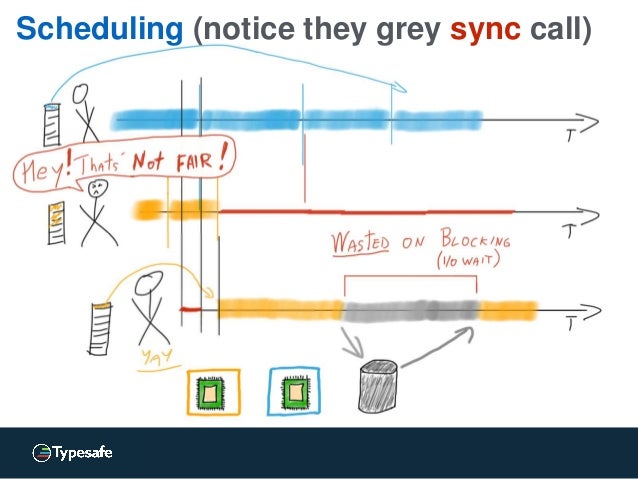
If I understand it correctly, it does not actually work like this in any reasonable runtime environment / operating system. As an example, consider doing java.io.InputStream.read() on a socket in Java (or any other language on the JVM) on Linux. If there is not data available in the buffer, this call will block until some packet is received by the network interface, which may take several seconds. During that time, the JVM Thread is blocked, but the JVM and/or Linux kernel will reschedule the CPU core to another thread or process and will wait for the network interface to issue an interrupt when some packet is received. You will waste some time on thread scheduling overhead and user/kernel mode switching, but that’s typically much less than the I/O waiting time.
July 2015
Leafpad > gedit
I want a simple, fast and lightweight text editor for my Linux desktop. I don’t want to learn a lot of new arcane key bindings, so not Vim or Emacs. I want a real GUI desktop application, not a console based one, so not nano (even though nano is nice when you only have a text console available). I don’t want a full-blown IDE for programming (I already have that) so I don’t need syntax highlighting and similar features.
June 2015
How to fix keyboard layout in Ubuntu 14.04
I regularly use Swedish keyboard layout, but I keep the English layout around in case I would like to temporary switch to it.
Ubuntu 14.04 sometimes mess this up and I suddenly get English layout when I log in. I fix this by installing dconf-editor, go to desktop/ibus/general, and make sure that the values engines-order and preload-engines are the same and in the desired order with the default layout first.
May 2015
Custom Preference for Android
I need a setting with a numeric value in my Android app. There is no obvious fit among the standard Preferences in Android, so I decided to implement my own Preference subclass.
This was a bit more involved than what I hoped for. I ended up with this. An improvement would be to be able to configure min and max values through XML attributes.
public class NumericPreference extends DialogPreference {
    private static final int DEFAULT_VALUE = 0;

    private NumberPicker mWidget;

    private int value = DEFAULT_VALUE;

    public NumericPreference(Context context, AttributeSet attrs) {
        super(context, attrs);

        setDialogLayoutResource(R.layout.numeric_dialog);
    }

    @Override
    protected void onBindDialogView(View view) {
        mWidget = (NumberPicker)view.findViewById(R.id.picker);
        mWidget.setMinValue(0);
        mWidget.setMaxValue(10);
        mWidget.setValue(value);
        super.onBindDialogView(view);
    }

    @Override
    protected Object onGetDefaultValue(TypedArray a, int index) {
        return a.getInteger(index, DEFAULT_VALUE);
    }

    @Override
    protected void onSetInitialValue(boolean restorePersistedValue, Object defaultValue) {
        if (restorePersistedValue) {
            value = getPersistedInt(DEFAULT_VALUE);
        } else {
            value = (Integer)defaultValue;
            persistInt(value);
        }
    }

    @Override
    protected void onDialogClosed(boolean positiveResult) {
        if (positiveResult) {
            value = mWidget.getValue();
            persistInt(value);
        }
    }
}<LinearLayout xmlns:android="http://schemas.android.com/apk/res/android"
android:layout_width="match_parent"
android:layout_height="match_parent"
android:orientation="vertical"
android:gravity="center_horizontal">
<NumberPicker
android:id="@+id/picker"
android:layout_width="match_parent"
android:layout_height="wrap_content" />
</LinearLayout>The code is covered by Apache License 2.0.
December 2014
Running Adobe Lightroom 4.4 in Ubuntu 14.04
I use Adobe Lightroom 4.4 for photo editing. There is one very annoying aspect of this program, it is not available for Linux (only for Windows and Max OS X).
In order to run Lightroom on my computer, I had to use VirtualBox and install Windows 7 in it. This works, but is quite clumsy and annoying. And since Lightroom is the only reason for me to run Windows, I would like to get rid of it.
October 2014
Create a self-contained .jar file with Maven
If you want to create a self-contained .jar file, with all library dependencies included, you can do it with Maven. Include this in your pom.xml:
<build>
        <plugins>
            <plugin>
                <groupId>org.apache.maven.plugins</groupId>
                <artifactId>maven-assembly-plugin</artifactId>
                <version>2.4</version>
                <configuration>
                    <archive>
                        <manifest>
                            <mainClass>com.yourcompany.youapp.Main</mainClass>
                        </manifest>
                    </archive>
                    <descriptorRefs>
                        <descriptorRef>jar-with-dependencies</descriptorRef>
                    </descriptorRefs>
                </configuration>
                <executions>
                    <execution>
                        <id>make-jar-with-dependencies</id>
                        <phase>package</phase>
                        <goals>
                            <goal>single</goal>
                        </goals>
                    </execution>
                </executions>
            </plugin>
	</plugins>
    </build>
Then when you run mvn package, you will get a target/*-jar-with-dependencies.jar file which you can run with java -jar.
Running Jetty as a service in Ubuntu Linux
Jetty is a popular open source Java application server. In order to run it as a service on a Linux server, they recommend using a horribly overcomplicated and quite fragile script.
In Ubuntu server, there is a better way. Leverage Upstart and its declarative job definitions.
First install Jetty into /opt/jetty and create a jetty user:
useradd --user-group --shell /bin/false --home-dir /opt/jetty/temp jettyThen create a file /etc/init/jetty.conf with content like this:
June 2014
Don’t use large BLOBs in MySQL from Java
The MySQL database can store large chunks of binary data (up to 1 GB) using the BLOB data types.
However, this does not work well if you access the MySQL database from Java (or any other JVM based language) using the MySQL JDBC driver.
The JDBC API supports an efficient stream based way to handle BLOBs, but the MySQL JDBC driver does not implement this properly. It works, but it will buffer all data in memory in a way which is very inefficient and can make your JVM run out of memory if the BLOBs are large.
March 2014
Don’t use PipedOutputStream on Android
I was using java.io.PipedOutputStream in an Android app. The app performed horribly bad. After doing some profiling, it turned out that the call to PipedOutputStream.write(byte[]) that was really slow. After digging into the Android source code, I discovered that PipedOutputStream.write(byte[]) was not implemented, it just delegated to the default implementation in OutputStream which iterate through the array and call PipedOutputStream.write(byte) for each byte.
Since PipedOutputStream.write(byte) does some synchronization and Object.notifyAll() each time, it is really slow to do this 1000 times when you write a block of 1 KB data.
December 2013
Running Adobe Lightroom 4.4 in Linux
I use Adobe Lightroom 4.4 for photo editing. There is one very annoying aspect of this program, it is not available for Linux (only for Windows and Max OS X).
In order to run Lightroom on my computer, I had to use VirtualBox and install Windows 7 in it. This works, but is quite clumsy and annoying. And since Lightroom is the only reason for me to run Windows, I would like to get rid of it.
October 2013
Using an embedded SQL database in Java web application
You have a Java web application needing a relational SQL database. According to JavaEE conventions, you declare the DataSource in web.xml:
<resource-ref>
    <res-ref-name>jdbc/DS</res-ref-name>
    <res-type>javax.sql.DataSource</res-type>
    <res-auth>Container</res-auth>
</resource-ref>
and then fetch it in code with (DataSource)new InitialContext().lookup("java:comp/env/jdbc/DS").
Using Maven, Jetty and HSQLDB, you can very easily run the web application for local testing without having to setup neither a web container, nor a database. Add this to pom.xml:
August 2013
GIMP 2.8 in Ubuntu 12.04
This is no longer relevant, since the PPA have updated to GIMP 2.8.10, which has fixed the bug.
If you use Ubuntu 12.04 LTS, you only have access to the old GIMP 2.6 in the standard repositories. This is unfortunate since GIMP 2.8 have a lot of new useful features.
The standard way to get GIMP 2.8 is to use the a PPA, as described here. This used to work fine. However, then the PPA upgraded to GIMP 2.8.6, which contains a horrible UI bug (seems like neither the GIMP team, nor the PPA maintainer has any particularly strong QA process).
January 2013
Using AAC music files in Android
If you have a file with .aac extension, it is AAC encoded audio in an ADTS container. If you want to play such file on an Android device, you have problems. Android 2.x does not support this file format at all, and not even the latest version of Android supports reading metadata tags from it.
The solution is to repackage the audio in an MPEG-4 container to a file with .m4a extension. Android can both play and read metadata tags from such files.
August 2012
How to design a RESTful protocol
What is REST?
In most cases, it is sufficient say that REST is a way to design a network protocol based on HTTP. I perfer to call it a RESTful protocol, but it can also be called RESTful API or RESTful Web Service. It is important to keep in mind that it technically is a network protocol, and not an API like an interface with some methods in a regular programming language.
July 2012
How to add password protection to GRUB2
These instructions are tested with Ubuntu desktop 12.04, but will probably be useful in other Linux distros with GRUB2 as well.
The goal is to block everything except booting the default system. In paricular, it should not be possible for anyone to boot into recovery mode, since that will bypass normal login and give root access directly.
- Run
grub-mkpasswd-pbkdf2from a terminal and enter the desired password, copy the output. - Edit
/etc/grub.d/40_customand add this to the end:
set superusers="root"
password_pbkdf2 root output from grub-mkpasswd-pbkdf2 goes here
password bogus bogus- Make
/etc/grub.d/40_customnon-readable for users:
chmod o-r /etc/grub.d/40_custom - Edit
/etc/grub.d/10_linuxaccording to this diff:
90c90,94
<   printf "menuentry '${title}' ${CLASS} {\n" "${os}" "${version}"
---
>   if ${recovery} || ${in_submenu}; then
>     printf "menuentry '${title}' ${CLASS} --users '' {\n" "${os}" "${version}"
>   else
>     printf "menuentry '${title}' ${CLASS} {\n" "${os}" "${version}"
>   fi
258c262
<     echo "submenu \"Previous Linux versions\" {"
---
> echo "submenu \"Previous Linux versions\" --users '' {"- Edit
/etc/grub.d/20_memtest86+according to this diff:
27c27
< menuentry "Memory test (memtest86+)" {
---
> menuentry "Memory test (memtest86+)" --users "" {
33c33
< menuentry "Memory test (memtest86+, serial console 115200)" {
---
> menuentry "Memory test (memtest86+, serial console 115200)" --users "" {
46c46
< #menuentry "Memory test (memtest86+, experimental multiboot)" {
---
> #menuentry "Memory test (memtest86+, experimental multiboot)" --users "" {
52c52
< #menuentry "Memory test (memtest86+, serial console 115200, experimental multiboot)" {
---
> #menuentry "Memory test (memtest86+, serial console 115200, experimental multiboot)" --users "" {- Run
update-grub
(I am not sure if it is possible to abuse memtest86+, but better safe than sorry.)
January 2012
Bachata Linux
Based on what I have desscribed in the two previous posts, I have now made a Linux distribution with an install CD.
It is called Bachata Linux, check it out here.
How to roll your own bootable Linux CD-ROM
When booting a regular Linux system, it just mounts some partition with a nice file system (such as ext4) on your HDD on / read/write and there you go.
When booting from a CD-ROM, it’s not that simple. The CD-ROM file system, ISO 9660, does not support the file names and attributes that a Linux system normally needs. And the CD-ROM is read only.
There are ways to work around these issues. You can use the Rock Ridge extension to ISO 9660 to get the file names and attributes needed. And the read only issue can be handled either as I have described in an earlier post, or by using unionfs.
December 2011
How to roll your own Debian based Linux distro
Goal
To build a minimal Debian based Linux system with a fully functional bash shell, TCP/IP networking with DHCP client and apt setup to be able to install any package from the Debian repositories. The resulting system will use about 157 MB disk space and consume less than 10 MB RAM.
This is now implemented in Bachata Linux.
Prerequisites
A Debian based Linux system to work from (e.g. Ubuntu desktop) with the debootstrap and extlinux packages installed. Some virtualization environment is highly recommended for testing, such as KVM/QEMU.
How to move MySQL data directory in Ubuntu Server
By default, the MySQL data is placed in /var/lib/mysql, which is a reasonable default. However, sometimes you want to place it somewhere else, such as on an other file system. Using a symlink doesn’t seem to work, so you have follow this procedure.
To move the MySQL data directory from /var/lib to /mnt/mydata, run these commands as root:
apt-get install mysql-serverservice mysql stopmv /var/lib/mysql /mnt/mydata/- replace
/var/lib/mysqlwith/mnt/mydata/mysqlin/etc/passwd– mysql/etc/mysql/my.cnf– [mysqld] datadir/etc/apparmor.d/usr.sbin.mysqld(twice)
service mysql start
November 2011
Using ZTE Blade Android phone with Ubuntu 11.10
Using a ZTE Blade Android phone connected with USB is a bit tricky with Ubuntu 11.10.
First you need to apply the patch in this bug, after doing that you should get USB storage to work.
After doing that, it is also possible to get development and debugging to work over USB. Create a group androiddev (addgroup --system androiddev), and add yourself to it (gpasswd -a yourUsername androiddev). Then create a file /etc/udev/rules.d/11-android.rules with this content (4 lines, watch the line breaks):
October 2011
How to disable activity logging in Ubuntu 11.10 Oneiric Ozelot
Ubuntu has mechanism to log user activity such as used documents. This is used to facilitate searching, but can also be intrusive to your privacy.
Here is a way to disable this logging without breaking Unity or any other part of the system, execute these commands in a terminal:
sudo mv /etc/xdg/autostart/zeitgeist-datahub.desktop /etc/xdg/autostart/zeitgeist-datahub.desktop-inactiverm ~/.local/share/recently-used.xbelmkdir ~/.local/share/recently-used.xbelrm -rf ~/.local/share/zeitgeist
then log out and log in again.
July 2011
Backup your mobile phone in Linux
To backup data from a non-smart SonyEricsson mobile phone (such as W890i) in Linux, use the gammu utility.
-
Install gammu, it is available as a package in the standard repositories for Debian and Ubuntu, just install the
gammupackage. -
Create a
~/.gammurcfile with the following content:> > [gammu]
> port = /dev/ttyACM0
> connection = at -
Connect your mobile phone to the computer with the USB cable and select
Phone mode -
Use
> gammu backup filename.vcf -yes
PHP session timeout
The developers of PHP has, in their infinite wisdom, decided that the default session timeout should be 24 minutes (1440 seconds).
This means that if you have a MediaWiki wiki and are editing a single page for half an hour and then click the save button, you are logged out and all your changes are lost. I just learned this the hard way.
Fortunately, you can change this with the session.gc_maxlifetime parameter in php.ini. So set this to a higher – more sane – value, such as 86400 (24 hours).
May 2011
Upgrade to Ubuntu 11.04 without Unity
The new Ubuntu release 11.04 Natty contains the new Unity desktop environment which is quite controversal. I have tried it for a while and I think it is neat but too buggy and immature. However, it is easy to revert to the old Gnome 2 desktop environment and have things working almost as in 10.10.
First do a normal distribution upgrade to 11.04, then go to System Settings -> Login Screen and select Ubuntu Classic as default session and reboot.
April 2011
Using Sveon SNT1020 WiFi USB adapter in Ubuntu
I just brought an Sveon SNT1020 WiFi USB adapter.
It works very well with Ubuntu Linux 10.10, just connect it to an USB 2 port and you can start using it with NetworkManager right away, no drivers or setup necessary. You should possibly disable any built-in WiFi adapters first though.
It cost €35.
November 2010
Web application frameworks in Java
When you know which type of web application you are to develop, it’s time to have a look at some possible choices.
I have tried to categorize some modern and popular web application frameworks in Java.
Simple server driven MVC page based
This category contains the traditional frameworks used for developing web applications with purely server driven application logic. They are based on complete HTML pages and uses the Model-View-Controller design pattern.
Web applications and web frameworks
If you are to develop a web application, there are a lot if frameworks to choose between.
I assume that the web application by its nature needs to have bi-directional communication between the web browser and the server during the execution, initial downloading of resources is not enough. I also assume that the available technologies are HTML, CSS and JavaScript/AJAX; no Flash, Java applets, ActiveX, Silverlight or other browser plug-ins are used.
August 2010
Mount your home directory with SSHFS in Linux
If you have your home directory on another machine, it’s common to use NFS to access it. NFS is easy to set up and works more or less out of the box on Linux. However, NFS is not secure, and you need to have a carefully setup firewall in order to use it safely.
SSHFS is a more secure alternative, but it’s quite tricky to set up on the client side. It’s very easy to set up on the server though, you just need an SSH server with SFTP support.
June 2010
Using Vaadin with Maven
Vaadin is a comprehensive framework for developing web applications in Java. The Vaadin web site presents a number of ways to use Vaadin with Maven, but I am not completely satisfied with any of those. Here is how I do it.
Use a pom.xml like this:
<?xml version="1.0" encoding="UTF-8"?>
<project xmlns="http://maven.apache.org/POM/4.0.0" xmlns:xsi="http://www.w3.org/2001/XMLSchema-instance"
	xsi:schemaLocation="http://maven.apache.org/POM/4.0.0 http://maven.apache.org/maven-v4_0_0.xsd">
	<modelVersion>4.0.0</modelVersion>

	<groupId>com.thecompany</groupId>
	<artifactId>theapp</artifactId>
	<version>1.0</version>
	<packaging>war</packaging>
	<name>The App</name>

	<dependencies>
        <dependency>
            <groupId>com.vaadin</groupId>
            <artifactId>vaadin</artifactId>
            <version>6.3.3</version>
        </dependency>
	</dependencies>

	<build>
		<plugins>
	        <plugin>
	            <groupId>org.apache.maven.plugins</groupId>
	            <artifactId>maven-war-plugin</artifactId>
	            <configuration>
	              <overlays>
	                <overlay>
		              <groupId>com.vaadin</groupId>
		              <artifactId>vaadin</artifactId>
		              <type>jar</type>
		              <includes>
		                <include>VAADIN/**</include>
		              </includes>
	                </overlay>
	              </overlays>
	            </configuration>
	         </plugin>

		<plugin>
			<groupId>org.mortbay.jetty</groupId>
			<artifactId>maven-jetty-plugin</artifactId>
			<version>6.1.17</version>
		</plugin>
        </plugins>
	</build>
</project>
And a src/main/webapp/WEB-INF/web.xml like this:
April 2010
Implementing POX Web Services with Spring WS and JAXB
Spring Web Services together with JAXB 2.0 provides a convenient way to implement POX Web Services in Java.
POX means Plain Old XML, and a POX Web Service is a protocol based on sending XML over HTTP without using any well-known protocol framework like SOAP or XML-RPC.
First you have to define annotated JAXB classes for all XML request and response messages. If you have a schema, you can generate them with the xjc tool. Or you can create and annotate them manually. It can be a good idea to make one abstract base class for all requests, and one for all responses.
How to implement RESTful JSON Web Services in Java
You can implement RESTful Web Services in Java using the JAX-RS framework.
JAX-RS is part of the JavaEE 6 platform. But if you are not using a JavaEE 6 application server, you can use the reference implementation Jersey and embed it in any web application server.
However, it’s quite awkward to produce JSON output from Jersey.
Jersey has some support for producing JSON via JAXB, but to get the NATURAL encoding (which you probably want) you need JAXB 2.1. And that can be problematic since JAXB 2.0 is bundled with JavaSE 6 and with some application servers (such as WebLogic). Overriding that with a later version of JAXB can be really difficult. Using JAXB is also a bit clumsy if you only want to produce JSON.
November 2009
Linux with / mounted read-only 2.0
(This is a new version of a previous post updated to work with Ubuntu 9.10 (karmic).)
I wondered why you usually mount / (the root file system) read-write in Linux and decided to do some experiments to find out if it is possible to have it mounted read-only.
So why do you want to do that? Perhaps you have the root file system on a read-only media, such as CD-ROM. Or on a writable media which can only handle a limited number of writes, such as a CD-RW or flash disk. It would also increase security since it will be more difficult (though not impossible) for some malware to infect your system.
September 2009
How to get microphone to work un Ubuntu 9.04
I finally got the microphone input on my Acer Veriton X270 to work un Ubuntu 9.04.
The trick is to uninstall PulseAudio and use ALSA only.
It even works in Skype.
August 2009
java.util.Map is broken in Java 5
Java 5 added generics. The collection classes was modified to make use generics to provide compile-time type-safe collections. Sadly, this was not done properly.
The worst problem is in the interface java.util.Map:
public interface Map<K,V> {
    // more methods...

    V get(Object key);
    V remove(Object key);
    boolean containsKey(Object key);
    boolean containsValue(Object key);
}
The key parameters to these methods ought to be declared to be K and not Object. Now we don’t get any type-safety for those methods. If you create a HashMap<String,String> and then by mistake try to use an int as key when looking up a value, you will not get any compile-time error. Worse yet, you will not even get any run-time error, it will just appear as if there is no value with that key (which in some sense is correct).
July 2009
Misuse of HTTP GET is a cardinal sin
According to the RESTful style, you should make use of the four HTTP methods GET, POST, PUT and DELETE. However, in many cases only GET and POST is used, and POST is used when you really should use PUT or DELETE. I consider this as a quite minor issue.
However, using GET instead of POST (or PUT or DELETE) is much worse.
The current HTTP 1.1 specfication (RFC-2616) clearly states that a GET request must be safe, i.e. not have any significant side-effect on the server. So in order to change anything on the server, you must use POST (or PUT or DELETE). The older HTTP 1.0 specification (RFC-1945) from 1996 said the same.
Running Ubuntu Linux on Acer Veriton X270
I recently brought an Acer Veriton X270.
Ubuntu Linux 8.04 works well except for sound. Basic stereo sound output works, but sound input (microphone) and some advanced 3D and surround sound does not work. The front headphone jack does not work correctly either. (All this works in Windows, so it’s not a hardware problem.)
Apart from the poor sound support in Linux, I am quite happy with this computer. It’s small (though not super small like Mac Mini or Fujitsu ESPRIMO Q), quiet, has all features you need and works out of the box. And it has a compelling price.
April 2009
Type safe JSP and JSTL
When using JavaServer Pages, you want to use JSTL to be able to to flow-control (iterations and conditionals) in a reasonable way. And the recommended way to use JSTL is to use the Expression Language (EL).
However, using EL is not a good idea at all. Contrary to Java and plain JSP, EL lacks static typing. This means that many errors which the compiler can catch is not detected until runtime when using EL. And even worse, EL doesn’t even do proper type checking at runtime. In many cases you just end up with an empty string when it in fact is a type error.
java -classpath *.jar
It’s quite annoying that you cannot use wildcards in the -classpath command line option to java and javac. Quite often you want to include all .jar files in one directory.
Here is a way to get that effect:
java -classpath `echo lib/*.jar | sed -e “s/ /:/g”` org.foo.MyApp
You can even include all .jar files in a whole hierarchy of directories:
java -classpath `find repository -name *.jar -printf %p:` org.foo.MyApp
January 2009
Things you might want to change in Ubuntu 8.04 (hardy) desktop, part 2
After installing Ubuntu 8.04 (hardy) desktop, there are some things you might want to change. This article focus on user configuration (mostly editing dot files in your home directory) and do not require superuser access. Some of this changes requires that you log out to take effect.
Customize the bash shell
By default, bash save all commands in a history file. This can be quite annoying when you run several instances of the shell in parallel, and may also be a security concern. Add this line at the beginning of ~/.bashrc to only keep command in memory until you exit the shell:
How to setup PPTP VPN in Linux
- Create a file
/etc/ppp/peers/name:
pty "pptp host --nolaunchpppd"
name username
remotename PPTP
require-mppe-128
file /etc/ppp/options.pptp
ipparam name- Add this line to the file
/etc/ppp/chap-secrets:
username PPTP password *- Create a file
/etc/ppp/ip-up.d/tunnel
#!/bin/sh
if [ "${PPP_IPPARAM}" = "name" ]; then
   route add -net RemoteNetworkWithNetmask dev ${PPP_IFACE}
fi
RemoteNetworkWithNetmask is the network on the remote side you want to access via the VPN tunnel, e.g. 172.16.0.0/12.
Things you might want to change in Ubuntu 8.04 (hardy) desktop, part 1
After installing Ubuntu 8.04 (hardy) desktop, there are some things you might want to change. This article focus on system configuration (mostly editing in /etc) and requires superuser access (using sudo). Some of this changes requires reboot to take effect.
Fix terminal font rendering bug
There is a bug which gives bad font rendering in the terminal window. Fix it by doing this in a terminal:
cd /etc/fonts/cond.d
sudo unlink 10-hinting-medium.conf
sudo ln -s ../conf.avail/10-hinting-full.conf
Fix bug in DHCP client
Fix a bug in the DHCP client described here.
How to use mousewheel in GNU Screen
GNU Screen has support for scrollback, but by default you have to use awkward keys to use it. I would like to be able to use Shift-PageUp, Shift-PageDown and the mousewheel to scroll, just like you can do in xterm.
It was not easy to configure Screen for this, and it involves cooperation with the terminal emulator. But I finally managed to achieve a solution which works pretty well. Add this to your ~/.Xresources file (create it f you don’t have it already) (you need to log out for this to take effect):
How to use Ctrl-Tab in GNU Screen
GNU Screen allows you to open several sub-windows within one terminal window. By default, you switch between them using Ctrl-A followed by n or p. I think this is a bit clumsy, I would like to switch with Ctrl-Tab and Ctrl-Shift-Tab just like you switch tabs in Firefox and many other applications. The sub-windows in Screen is conceptually just like tabs in Firefox, so it’s logical to use the same keys to switch between them.
December 2008
Configure web applications in JBoss
When you deploy a web application in a JavaEE application server, it usually consist of a .war archive.
Sometimes, the web application needs some configuration parameters. The most common way to do this is to have <context-param> in web.xml. That is simple and works fine except that the web.xml file needs to be inside the .war archive. This makes it inconvenient to change a configuration parameter since you have to repack the .war archive. You also have to set the same value several times if several web applications share the same configuration.
Packages you might want to remove from Ubuntu 8.04 (hardy) desktop
When you install Ubuntu 8.04 (hardy) desktop, you get a lot of packages installed by default. Most users will never use many of these packages, so you end up with a lot of unnecessary packages. Most of these packages are harmless and only waste disk space when not used.
However, some packages can actually affect the system in a negative way, such as draining resources (other then disk space), and you should consider removing them if you not actively use them.
July 2008
Linux with / mounted read-only
(This post has been edited since it was first published.)
I wondered why you usually mount / (the root file system) read-write in Linux and decided to do some experiments to find out if it is possible to have it mounted read-only.
So why do you want to do that? Perhaps you have the root file system on a read-only media, such as CD-ROM. Or on a writable media which can only handle a limited number of writes, such as a CD-RW or flash disk. It would also increase security since it will be more difficult (though not impossible) for some malware to infect your system.
October 2007
Why can only root listen to ports below 1024?
(This article has been edited since it’s first publication.)
In Linux, and other UNIX-like systems, you have to be root (have superuser privileges) in order to listen to TCP or UDP ports below 1024 (the well-known ports).
This port 1024 limit is a security measure. But it is based on an obsolete security model and today it only gives a false sense of security and contributes to security holes.
The port 1024 limit forces you to run all network daemons with
superuser privileges, which might open security holes. Without the port 1024 limit, most network daemons (except sshd), could be run without superuser privileges. Some daemons try to remedy this potential security hole by dropping the superuser privileges after binding to the port, but you still need to start the daemon as root. And this does not work if the daemon is written in Java, which is quite popular for web servers.
May 2007
Common mistakes with exceptions in Java
Unintentional catching of runtime exceptions
Unfortunately, checked exceptions in Java are defined as all Exceptions which are not RuntimeExceptions. This makes it a bit tricky to catch all checked exceptions (but not any runtime exceptions). It would have been better if checked exceptions were defined by a specific class, CheckedException, but that’s too late to change now.
Too often Java programmers catch all exceptions when they really only should catch checked exceptions. However, there is a quite easy workaround to catch all checked exceptions, and nothing else:
March 2007
Linux on diskless workstation
When the built-in HDD controller in my computer broke down, I decided to try running my computer diskless with LAN booting. I use Ubuntu Linux 6.10 and I have another computer with a large HDD acting as server.
I followed the instructions in this HOWTO. I changed MODULES to “netboot” in initramfs.conf and I had to add a driver for my network adapter to the modules file in the initramfs configuration. It took me a while to realize why it didn’t work without the network adapter driver. I also mounted /tmp as tmpfs.
September 2006
Poor Javascript performance is an obstacle in AJAX development
I’m currently developing my first AJAX based web application. The goal is to have a pure AJAX application, i.e. never reload the entire page, use only background XMLHTTPRequest to contact the server.
My observations so far is that it is possible to do most of the application logic I need. But the performance of Javascript execution in the browser is a big obstacle. The application is centered around a list of data items in a scrollable area. The list is loaded as preformatted XHTML with an AJAX request and then some Javascript is used to decorate it with event handlers. I would like to display up to 1000 items at once, but I quickly realized that this wasn’t possible. The Javascript loop triggered the timeout in the browser after about five seconds. This timeout does not count waiting for the server to deliver the response, it only counts the client Javascript code to process the response. This timeout is reasonable, it’s clearly not acceptable for the user to wait over five seconds for the browser to process the server response (in addition to wait for the server and network to deliver the response). After limiting to 100 item, it works.
May 2006
Who needs rmiregistry?
Java Remote Method Invocation (RMI) contains a tool rmiregistry to run a stand-alone remote object registry. According to the RMI tutorial, rmiregistry is normally used in an RMI application.
I wonder why. It’s actually almost as simple to run the remote object registry within the RMI server. You only have to use java.rmi.registry.LocateRegistry#createRegistry(int port) method like this:
Registry registry = LocateRegistry.createRegistry(port);
registry.bind("Foo", stub);
Here is a complete example.